Views: 0 Author: Site Editor Publish Time: 2026-07-20 Origin: Site
Choosing between WiFi 6 and WiFi 7 is not simply a matter of buying the newest wireless standard. An ONU/ONT must first match the PON system, service speed, Ethernet interfaces, and connected devices; otherwise, a faster radio may still be limited by a 1GE port or an incompatible optical network.
This comparison explains when a wifi 6 ont device or wifi 6 ont router remains sufficient, when WiFi 7 offers meaningful value, and whether an integrated gateway, fiber ONT modem, or separate router setup better fits an all-optical network.
Wireless specifications are irrelevant until the terminal can operate on the access network. GPON, EPON, XPON, XG-PON, and XGS-PON describe different optical systems, and the selected ONU/ONT must match the OLT’s protocol, registration process, and operator profile. XPON dual-mode equipment is useful where installers work across both GPON and EPON environments, but dual-mode support does not guarantee universal interoperability.
Bandwidth planning also changes with the PON generation. Standard GPON commonly operates at nominal rates of 2.488 Gbit/s downstream and 1.244 Gbit/s upstream, while XGS-PON operates at a nominal 10 Gbit/s in both directions. That distinction matters when a network must deliver multi-gigabit service rather than merely support a faster local wireless connection.
After confirming optical compatibility, inspect the complete traffic path. A 1GE port can cap practical throughput near the gigabit class even when the radio advertises several gigabits of aggregate capacity. A 2.5GbE interface suits faster residential plans, NAS transfers, and higher-capacity access points, while 10GbE is more relevant to XGS-PON or premium WiFi 7 deployments.
Port speed is only one factor. NAT throughput, bridge-mode performance, VLAN handling, QoS, packet acceleration, memory, and CPU capacity determine whether the terminal can sustain traffic under load. A WiFi 7 model with a weak forwarding path may offer less usable performance than a properly matched wifi 6 ont device.
WiFi 6 remains a strong match for gigabit FTTH and many moderate multi-gigabit environments. OFDMA divides channel resources so multiple clients can be served more efficiently, while MU-MIMO helps an access point communicate with several compatible devices during the same period. These gains matter in homes, apartments, hotel rooms, and small offices where phones, laptops, televisions, cameras, and smart devices compete for airtime.
A wifi 6 ont router also fits mixed client populations because older devices can continue using 2.4 GHz or 5 GHz connections. WPA3, Target Wake Time, band steering, and multiple SSIDs can improve security, power use, and traffic organization when implemented effectively. Its practical advantage is mature, efficient connectivity rather than a promise that every client will reach a theoretical maximum rate.
WiFi 7 targets higher throughput, lower latency, and more flexible spectrum use. Major capabilities include channels up to 320 MHz, Multi-Link Operation, and 4K QAM. Together, they can increase capacity when the access point, client, spectrum allocation, and signal quality all support them. Multi-Link Operation is especially relevant because compatible devices can use more than one wireless link instead of relying on a single band.
Those improvements are most useful on multi-gigabit broadband, fast local-storage networks, dense workplaces, demanding wireless backhaul, and latency-sensitive applications. A WiFi 7 ONU/ONT therefore makes sense when the optical service and Ethernet path can already supply sufficient bandwidth. Wider channels and higher modulation do not automatically improve wall penetration, and maximum performance still requires favorable radio conditions.
The benefit shrinks when most client devices remain on WiFi 5 or WiFi 6. Backward compatibility keeps those devices connected, but they cannot use the complete WiFi 7 feature set. Access to 320 MHz channels also depends on suitable 6 GHz availability, regional regulations, and hardware that supports the required band and channel width.
Physical placement may matter more than the wireless generation. A gateway installed inside a metal cabinet or positioned at one edge of a large property can still deliver poor coverage. When the service is limited to 1G, the terminal has only 1GE ports, or the client population is mostly older, WiFi 6 is usually the more proportionate investment.
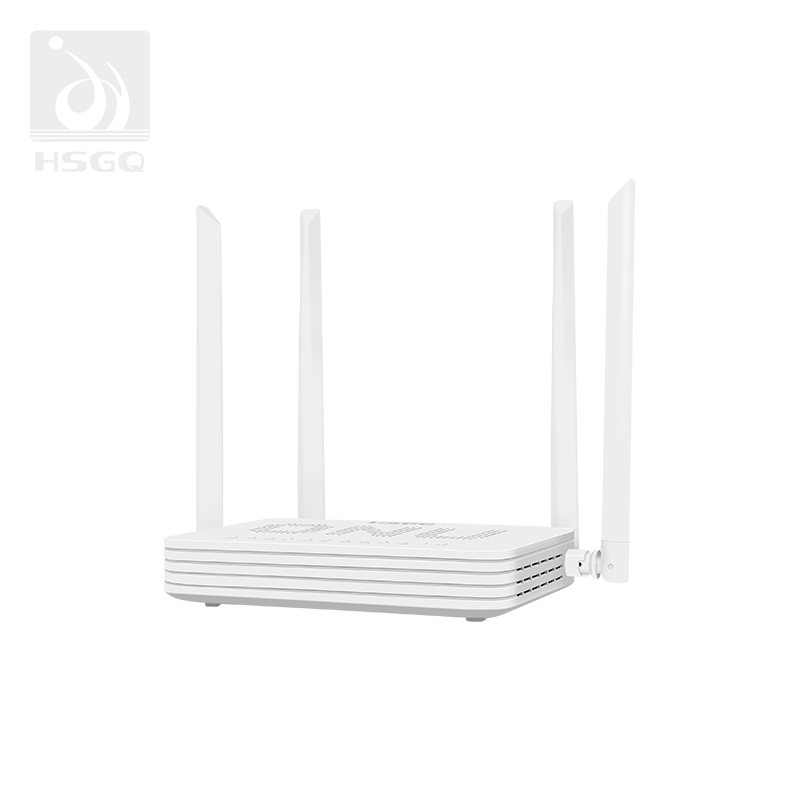
An integrated unit combines optical termination, routing, Ethernet switching, and wireless access in one enclosure. It suits homes, apartments, hotel rooms, retail locations, and small offices where fast installation and fewer powered devices matter more than modularity. Centralized configuration can also simplify diagnostics because the optical connection and subscriber gateway are managed through one platform.
The trade-off is placement. Fiber often enters a building at a location selected for cabling convenience rather than radio coverage, leaving the access point near an exterior wall, utility box, or equipment cabinet. HSGQ provides WiFi-integrated, dual-band, voice, CATV, PoE, MDU, and XPON stick options for different FTTH and business deployments. Its WiFi 6 models can include AX3000 wireless capability, Gigabit LAN interfaces, and OMCI or TR-069 remote maintenance.
Separating the optical terminal from the router creates a more flexible upgrade path. The fiber ONT modem can remain in bridge mode while an external WiFi 6 or WiFi 7 router handles firewall policies, mesh coordination, VPN functions, traffic management, and coverage. This arrangement is valuable when the best fiber termination point is not the best access-point location.
This configuration also meets the need behind wifi 6 ont for wifi router searches. The ONT does not require built-in WiFi when it provides a compatible and sufficiently fast Ethernet handoff. Businesses can pair it with managed access points, while larger homes can position mesh nodes around actual usage areas. The disadvantages include extra cabling, another power supply, and more configuration involving NAT, DHCP, VLAN tagging, and authentication.
An XPON stick places ONU functions in an SFP-style module for a compatible router, switch, or custom gateway. It reduces equipment count in space-constrained designs, but compatibility must be checked at both the optical and host-device levels. The SFP-style form factor does not automatically guarantee suitable power delivery, thermal handling, management access, or OLT registration support.
The HSGQ XPON Stick supports GPON and EPON adaptation in a compact form intended for compatible SFP ports. Available functions can include GPON-class line rates, VLAN configuration, digital diagnostics, remote management, and routed WAN operation. This format is best treated as a specialized option for controlled deployments rather than a universal replacement for a desktop ONU/ONT.
For a standard 1G FTTH household, an integrated WiFi 6 ONU/ONT is usually the cleanest choice. It handles optical access and provides efficient wireless service without adding equipment that the subscription or client devices cannot fully use. Apartments and small offices with moderate device counts often benefit from the same simplicity, particularly when centralized operator support is available.
A standalone 2.5GbE terminal and external router become more attractive with a faster plan, NAS, advanced security policies, or mesh coverage. WiFi 7 is justified when several compatible clients, multi-gigabit traffic, and suitable Ethernet ports are already present. In a large property, two correctly positioned WiFi 6 access points may outperform one powerful WiFi 7 gateway located beside the fiber entry point.
Hotels and multi-room buildings should prioritize topology, segmentation, and manageability. Distributed access points, VLANs, guest isolation, multiple SSIDs, optical diagnostics, and remote firmware control often have more operational value than one high-specification gateway. Offices must also estimate simultaneous users, internal transfers, conferencing demand, application latency, and capacity between switches, ONUs, and access points.
XGS-PON supports a stronger case for WiFi 7, but only when 2.5GbE or 10GbE paths continue beyond the optical terminal. Existing sites should compare a complete ONU/ONT replacement with a smaller router or access-point upgrade. Keeping a stable optical terminal and modernizing only the wireless layer can reduce cost and disruption when the current PON service remains adequate.
Start with the exact PON standard and OLT requirements supplied by the operator or network designer. Registration may depend on a serial number, password, LOID, vendor profile, or operator-specific provisioning, so a technically similar terminal may still fail to authenticate. The connector type, receive-power range, and expected optical budget must also fit the installed distribution network.
Service functions deserve the same attention. Confirm bridge and router modes, IPv4 and IPv6 behavior, VLAN configuration, IPTV multicast, voice or POTS, CATV, QoS, and required security policies. For ISP or multi-site use, verify OMCI, TR-069, upgrade procedures, alarm reporting, optical diagnostics, and the remote controls available to operations teams.
Match every Ethernet interface to the broadband tier and expected local traffic rather than checking only the fastest port on the device. Review how many phones, computers, and access points can use WiFi 6 or WiFi 7, then confirm whether 6 GHz operation is permitted and practical. Coverage planning should consider walls, interference, antenna layout, ventilation, and the possible need for mesh nodes or separate access points.
The final comparison should include lifecycle cost rather than purchase price alone. Firmware support, remote troubleshooting, power consumption, replacement effort, and independent upgrade options affect the real cost over several years. A balanced terminal fits the current optical service while leaving useful and affordable headroom for the next planned upgrade.
Choosing between WiFi 6 and WiFi 7 should begin with the optical network, not the wireless label. A well-matched ONU/ONT must support the PON standard, service speed, Ethernet interfaces, client mix, and coverage plan. WiFi 6 remains practical for many gigabit deployments, while WiFi 7 is more relevant to multi-gigabit networks with compatible devices.
Shenzhen HS Fiber Communication Equipment CO., LTD. offers ONU/ONT and XPON options for integrated or modular deployments, helping operators and users align optical access, routing, and wireless capacity without unnecessary over-specification.
A: An ONU/ONT terminates the fiber connection and converts optical signals into usable network interfaces. A router then distributes that connection across wired devices and WiFi clients.
A: Choose WiFi 7 when the service, Ethernet ports, and client devices support multi-gigabit traffic. For gigabit plans and mostly older clients, WiFi 6 usually remains sufficient.
A: Yes. WiFi 7 devices are backward compatible and can connect to WiFi 6 networks, but they operate within the older network’s available bands, channels, and features.
A: Usually, yes, provided the ISP supports the arrangement and the router has a compatible Ethernet WAN interface. Authentication, VLAN, or bridge-mode settings may still be required.
A: No. WiFi 7 can improve local wireless performance on slower fiber services, but XGS-PON is better aligned with deployments intended to deliver symmetric multi-gigabit access.
A: Not necessarily. Coverage still depends heavily on frequency, transmit power, antennas, placement, and building materials. WiFi 7 mainly improves capacity, channel use, and latency.