Views: 0 Author: Site Editor Publish Time: 2026-04-28 Origin: Site
With the proliferation of smart home devices and the widespread adoption of 4K/8K streaming content, the performance of the optical modem (ONU/ONT), the "throat" of the home network, is particularly crucial. If you're looking to upgrade your home broadband experience, a Wi-Fi 6 XPON ONU/ONT is undoubtedly the most noteworthy core hardware option currently available.

What is a Wi-Fi 6 XPON ONU/ONT?
1. XPON Technology (EPON + GPON): XPON stands for "Passive Optical Network Compatible." It integrates both EPON (Ethernet Passive Optical Network) and GPON (Gigabit Passive Optical Network) modes. This means the device has strong carrier compatibility and can automatically identify and adapt to different access network environments.
2. Wi-Fi 6 (802.11ax): This is currently the mainstream Wi-Fi transmission standard. Compared to its predecessor, Wi-Fi 5, it represents a qualitative leap in speed, latency, and multi-device concurrent processing capabilities.
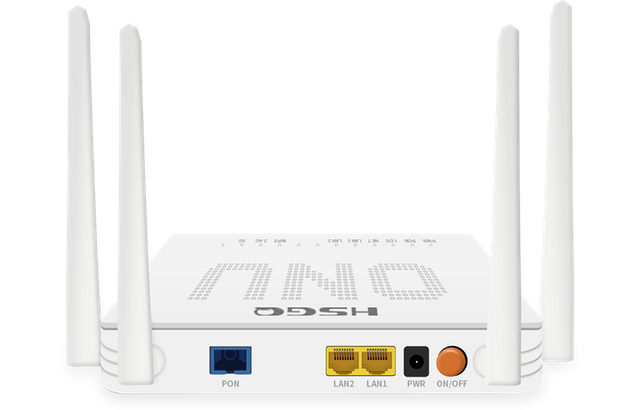
A Wi-Fi 6 XPON ONU/ONT combines these two technologies, allowing it to directly receive carrier signals from the fiber optic interface (without an additional optical modem) and directly transmit high-speed, high-density Wi-Fi 6 wireless signals—a "modem-router integrated device."
The Evolution and Development of Wi-Fi 6 XPON ONUs
Every upgrade in network technology is essentially aimed at solving the problem of "efficiency."
The Leap from Wi-Fi 5 to Wi-Fi 6: In the Wi-Fi 5 era, routers often experienced "congestion" when multiple devices were connected to the network simultaneously. Wi-Fi 6 introduced OFDMA (Orthogonal Frequency Division Multiple Access) and MU-MIMO (Multi-User Multiple-Input Multiple-Output) technologies, essentially upgrading a single-lane road to a multi-lane highway. Data transmission no longer needs to queue, significantly improving transmission efficiency.
The Maturation of XPON: Early optical modems typically required fixed operator binding (e.g., limited to China Telecom or China Unicom). Now, Wi-Fi 6 XPON ONUs/ONTs are more open, supporting adaptive switching, which greatly facilitates users in freely choosing broadband packages and changing operators.
Integrated Wi-Fi ONU All-Optical Network Solution
In modern fiber optic access networks, single hardware purchases can no longer meet the increasingly complex market demands. HSGQ's integrated Wi-Fi ONU solution is designed to provide ISPs (Internet Service Providers) and network integrators with efficient, plug-and-play network deployment capabilities.
Zero-Touch Provisioning: With its built-in auto-configuration function, the ONU automatically synchronizes and registers with the OLT after connecting to fiber optic cable, significantly reducing the operation time for on-site installation engineers.
Unified Remote Management (TR-069/OMCI): Supports remote parameter modification, firmware upgrades, and fault diagnosis via the TR-069 protocol, achieving "cloud-based maintenance" and significantly reducing on-site repair rates.
Multi-Scenario Compatibility: Provides customized frequency band settings and coverage optimization for different environments such as homes, SOHO offices, and hotel apartments, ensuring no dead zones in Wi-Fi signal coverage.
Why Choose an Integrated ONU?
A Wi-Fi 6 ONU is more than just a router replacement; it's a deep fusion of Fiber Optic Access (PON) technology and wireless transmission technology.
1. Technical Specification Advantages
XPON Compatibility: Automatically identifies EPON or GPON network modes, adapting to operator network upgrades without requiring device replacement.
Wi-Fi 6 High-Performance Concurrency: Utilizes MU-MIMO and OFDMA technologies, supporting not only high bandwidth at a single point but, more importantly, maintaining extremely low latency in multi-device access environments, perfectly handling the demands of video conferencing, 4K video streaming, and cloud gaming.
Hardware Processing Capabilities: Integrates a high-performance CPU, ensuring no bandwidth loss when handling complex firewall rules and QoS traffic control.
2. Intelligent Management
Our integrated solution is deeply compatible with operators' ACS (Automatic Configuration Server) systems, allowing operators to:
Remotely monitor the online status of user devices.
Issue Wi-Fi password modification commands with a single click.
Acquire link quality data such as optical power in real time, enabling "fault detection before users."
Application Scenario Analysis
This integrated solution can flexibly adapt to different business models:
FTTH (Fiber to the Home) Scenario:
Pain Point: Many dead zones in users' homes, unstable device connections.
Integrated Solution: Provides high-performance, wall-penetrating Wi-Fi 6 ONUs, coupled with flexible Wi-Fi power adjustment, to achieve whole-house coverage.
SMB/Apartment Scenario:
Pain Point: Large number of connected devices, chaotic management.
Integrated Solution: Utilizes SSID separation to provide logically isolated networks for office areas and visitor areas, ensuring enterprise information security.
Rapid Deployment by Carriers:
Pain Point: Inconsistent technical skills of installers.
Integrated Solution: Pre-configuration service; devices are pre-programmed with carrier parameters at the factory, allowing for immediate internet access upon connection, significantly improving user satisfaction.
How to Apply and Connect: Wi-Fi 6 XPON ONU Installation Guide
Deploying a Wi-Fi 6 XPON ONU/ONT is not complicated and generally follows these steps:
Physical Connection:
Plug the fiber optic cable (usually with a green connector) from your ISP into the ONU's PON port.
Ensure the fiber optic connector is clean and not excessively bent; this is essential for signal quality.
Access Configuration:
After connecting the power supply, connect your computer or mobile phone to the ONU's LAN port using an Ethernet cable.
Log in to the device's backend (usually by entering a management address such as 192.168.1.1 in your browser).
Key Point: Enter your ISP account and password (PPPoE dial-up). The device will automatically register and authenticate.
Wi-Fi Settings:
Enable Wi-Fi 6 in the management interface (enable 802.11ax mode). It is recommended to combine the 2.4GHz and 5GHz bands (dual-band merging) to allow the device to automatically allocate the best network bandwidth.
How to Use in a Home/Apartment? Optimization Tips
In an apartment or residence, the placement of your Wi-Fi 6 XPON ONU/ONT directly determines your internet experience:
Centralized Placement: Do not place the ONU inside a weak current box or cabinet. Walls and metal shielding severely attenuate the high-frequency Wi-Fi 6 signal. Place it in a central, well-ventilated area of your apartment.
Utilize Wi-Fi 6's Interference Resistance: Apartment environments often experience significant Wi-Fi interference (signals from neighbors crossing over). Wi-Fi 6 has better interference resistance algorithms, ensuring stable streaming or gaming connections even in environments with high interference.
Connect More Smart Devices: The core advantage of Wi-Fi 6 lies in its capacity. If you have a large number of smart home devices (such as cameras, smart speakers, and sensors), a Wi-Fi 6 XPON ONU/ONT can easily connect 30-50 devices without dropping the connection or experiencing lag.
Why Choose HSGQ's All-Optical Network Solution?
As a professional supplier deeply rooted in the optical communications field, we offer not only products, but also turnkey projects:
Customized Development: We provide customized services and deep firmware integration based on your brand needs.
Supply Chain Assurance: From chip selection to mass production, we strictly control quality to ensure operational stability in various climatic environments.
Technical Empowerment: We provide comprehensive training materials, technical support documents, and even remote technical guidance in the early stages of the project to ensure your team can deliver efficiently.