Views: 0 Author: Site Editor Publish Time: 2026-06-09 Origin: Site
A growing network often fails in small, frustrating ways before it fails completely: slow video calls, unstable camera feeds, guest Wi-Fi reaching the wrong systems, or uplinks that become overloaded without warning. A basic Switch may keep devices connected, but it cannot show what is happening or help control traffic when the network expands. Managed network switches solve that gap by adding visibility, VLAN control, security functions, routing options, and troubleshooting tools. Understanding where they fit helps teams choose the right L2 or L3 model and avoid avoidable network problems.
A managed Switch becomes useful when a network is no longer just a few computers sharing internet access. Offices need separate traffic paths for staff laptops, printers, VoIP phones, meeting-room systems, and guest Wi-Fi. Schools and campuses add more complexity because classrooms, administration offices, dormitories, and public access zones may share cabling without sharing the same permissions. Hotels, apartments, and residential communities face the same issue: many users connect through one infrastructure, but not every user should reach internal systems.
In these environments, the value is control. A managed Switch can place guest Wi-Fi on one VLAN, business devices on another, IP phones on a voice VLAN, and cameras on a separate surveillance network. Uplinks between floors or buildings can be monitored instead of guessed, which helps teams identify congestion before users report slow access. HSGQ lists small ISP, hotel and apartment, school campus, office park, and medical facility scenarios, matching the types of shared networks where managed switching is normally justified.
Surveillance networks are a clear use case because IP cameras generate constant upstream traffic. A camera network may look simple at the edge, yet dozens of cameras can overload a weak uplink when every stream travels toward a recorder or monitoring room. Fiber access is often added when cameras, access points, or remote network cabinets sit beyond reliable copper Ethernet distance. SFP and SFP+ uplinks also help aggregate many access links into a faster backbone.
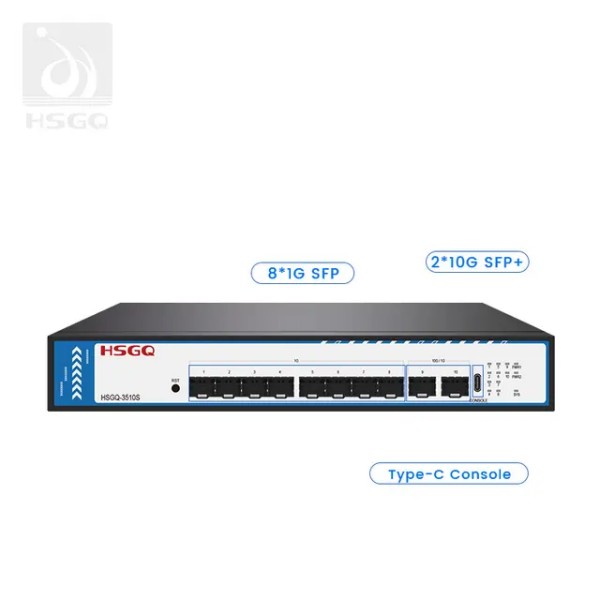
For fiber-heavy access, HSGQ’s L2 managed optical Switch provides eight 100M/1000M SFP slots and two SFP+ ports that support 1G to 10G speeds, making it relevant for access-to-core aggregation. For camera and wireless access networks, HSGQ’s 24*2.5GE PoE managed model combines 24 2.5GE RJ45 downlink ports with six 10G SFP+ uplink ports, supporting edge density when many endpoints feed high-speed uplinks. The practical lesson is simple: port count alone is not enough. Uplink speed, optical reach, PoE planning, and traffic direction decide whether the design remains stable under load.
A Switch works by learning which MAC addresses appear on which ports. When a device sends traffic, the Switch records the source MAC address in its table, then uses that table to forward later frames toward the correct destination. Unknown traffic may still be flooded at first, but normal communication becomes more efficient once the table is learned. This is why a managed Switch can reduce unnecessary traffic while still requiring a correct topology.
VLANs add logical separation on top of that forwarding behavior. Instead of building separate physical networks for office users, guests, cameras, and phones, an administrator can divide one physical infrastructure into several traffic domains. A common misunderstanding is that VLANs automatically route traffic between groups; they do not. VLANs separate traffic first, while routing between those VLANs must be handled by a router, firewall, or Layer 3 Switch interface.
Management features turn the Switch from a passive connector into an operational control point. QoS helps prioritize voice, video meetings, or surveillance streams when links are busy. Port mirroring copies traffic from one port to another for packet analysis, while SNMP, web management, CLI, console access, and logs show what is happening before support teams start guessing.
Other functions protect topology and user access. STP, RSTP, and MSTP reduce loop risk; link aggregation and LACP combine physical links for bandwidth and resilience; LLDP documents neighboring devices; DHCP Snooping, ACLs, and loop detection help limit common failures or abuse. HSGQ’s L2+ managed optical model supports VLAN, QoS, static routing, DHCP Snooping, STP/RSTP/MSTP, ERPS, LLDP, LACP, ACL, SNMP, MQTT, and management methods including Type-C console, Web CLI, Telnet, SSH, and SNMP.
Feature | What it does | When it matters | Beginner mistake to avoid |
VLAN | Separates traffic into logical networks | Guest Wi-Fi, cameras, phones, departments | Creating VLANs without gateway or DHCP planning |
QoS | Prioritizes sensitive applications | VoIP, video meetings, CCTV streams | Marking everything as high priority |
STP/RSTP/MSTP | Prevents loop-related outages | Multi-switch topologies | Disabling it because the network “looks simple” |
SNMP/logs | Provides visibility and alerts | Remote support and maintenance | Buying managed hardware but never monitoring it |
LACP | Bonds links for bandwidth and redundancy | Uplinks, servers, aggregation | Configuring only one side of the link |
A good way to judge a managed Switch is to connect every feature to a problem. Voice delay points toward QoS, random outages point toward loops or unstable links, unknown access points toward port security and ACLs, and poor visibility points toward monitoring. That problem-first view prevents feature lists from becoming meaningless. It also helps buyers avoid paying for advanced functions the network team will never configure.
What is an L2 switch in networking? It is a device that forwards traffic mainly by MAC address and manages Layer 2 functions such as VLANs, STP, QoS, link aggregation, and port-level controls. An l2 network switch is often enough for the access layer because many networks already use a router or firewall for inter-VLAN routing, internet access, NAT, and security inspection. That makes L2 cost-effective when the goal is controlled access rather than distributed routing.
Choose L2 or L2+ when the main job is to connect users, phones, cameras, access points, or fiber access nodes back to a central gateway. Hotel floors, office areas, small campus buildings, and residential access cabinets often fit this pattern. HSGQ’s L2 managed optical Switch is described as an L2+ model with static routing, meaning it can support some basic Layer 3 behavior without becoming a full routing platform. The distinction matters because L2+ can be useful for simple cross-VLAN control, but dynamic routing and larger routed designs still belong in the L3 category.
A l3 managed network switch becomes the better fit when several VLANs need to exchange traffic frequently and the gateway should not become a bottleneck. Instead of sending every inter-VLAN packet to a separate router or firewall, the L3 Switch can route between VLAN interfaces directly at the switching layer. This design can reduce latency, simplify campus routing, and keep heavy east-west traffic away from a central security appliance when inspection is not required. Larger networks also gain cleaner redundancy options.
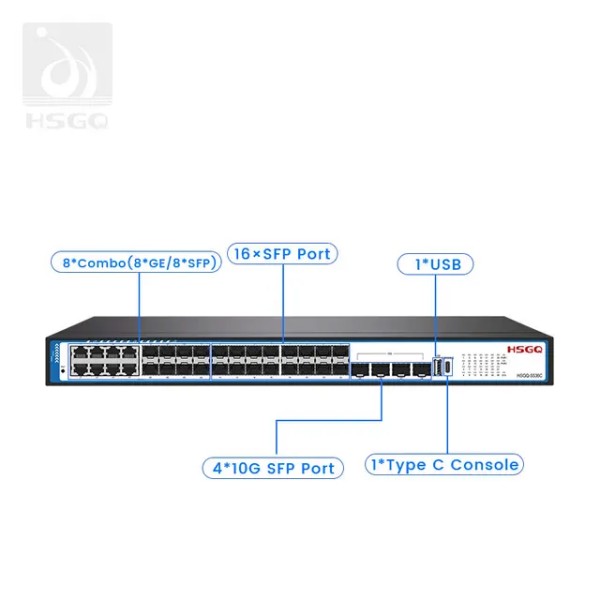
Decision factors include VLAN count, interdepartment traffic, multi-building routing, and dynamic routing requirements. HSGQ’s 16*SFP Port L3 model supports IPv4/IPv6 dual stack, static routing, DHCP Server, DHCP Relay, DHCP Snooping, RIP, RIPng, OSPF, OSPFv3, and VRRP, along with VLAN, QoS, and security policies. That feature set fits enterprise, campus, hotel, and multi-building networks where routing, redundancy, and centralized management shape the design.
Slow performance is often blamed on the internet connection, but the fault may sit inside the local switching path. Overloaded uplinks, duplex mismatch, bad cables, weak optical modules, insufficient switching capacity, and unplanned camera or backup traffic can all create packet loss. Port statistics reveal the clues: CRC errors suggest physical faults, high utilization points to congestion, and repeated link flaps suggest cabling, module, or power issues.
Troubleshooting should move from physical to logical checks. Confirm cable category, module compatibility, port speed, duplex status, and whether the uplink is overloaded. On fiber links, DDM reports SFP/SFP+ voltage, bias current, temperature, optical input power, and optical output power. HSGQ’s L2+ optical model supports DDM, helping administrators identify weak optical links instead of replacing modules blindly.
VLAN mistakes usually appear as access problems rather than obvious Switch failures. A user may receive the wrong IP address, a camera may disappear, or a guest network may reach internal systems. Common causes include a tagged/untagged mismatch, the wrong native VLAN, missing trunk permissions, incorrect DHCP relay, or an ACL blocking traffic.
Start by checking the port role. Access ports should carry one untagged VLAN, while trunk ports should carry only required VLANs. DHCP Snooping must match trusted uplink ports, and relay settings must point clients toward the correct server. Verify gateways, subnet masks, and routing rules before blaming hardware.
Loops can make a healthy network look completely broken. When two switching paths form a circle and no protection blocks the redundant path, broadcast traffic can multiply. Users may report disconnects, slow logins, failed calls, or unstable cameras despite active links.
Protection should be active before the incident happens. STP, RSTP, MSTP, loop detection, and ERPS reduce the chance that one wrong cable can bring down the LAN. During troubleshooting, isolate the segment, review topology change logs, identify abnormal broadcast traffic, and check for unmanaged downstream devices. HSGQ’s 12-port industrial L3 model includes loop detection that can block a loop port and restore communication after the loop is removed.
Security failures often start with basic operational neglect. Default passwords, exposed web management, unused live ports, outdated firmware, shared admin accounts, and missing backups can turn a managed Switch into a weak point. SNMP should use secure versions where possible, remote management should stay inside trusted VLANs, and unused ports should be disabled or isolated. Access policies such as 802.1X, RADIUS, TACACS+, IP Source Guard, Dynamic ARP Inspection, and DHCP Snooping work best with a clear access model.
Use this checklist when a Switch behaves unpredictably after a configuration change:
● Physical link: cable, module, errors, optical power, speed, duplex, and power.
● VLAN and IP: access/trunk mode, allowed VLANs, DHCP relay, gateway, ACLs, and routing.
● Loop protection: STP/RSTP/MSTP status, loop logs, ERPS state, and unmanaged devices.
● Capacity and management: utilization, drops, LACP state, firmware, backups, and management access.
A disciplined troubleshooting process is faster than random replacement. Begin with the layer most likely to fail, then move upward from physical link to VLAN, IP, routing, and security policy. Keep a known-good backup before changing settings, especially where a wrong management VLAN can lock out access. The best managed Switch deployment is specified, documented, monitored, and maintained.
A managed Switch is most valuable when a network needs more than basic connectivity. VLAN control, QoS, monitoring, routing options, and troubleshooting features help teams reduce downtime, separate traffic, and plan for future growth with fewer hidden risks. Choosing between L2 and L3 depends on how much routing, segmentation, and scalability the network actually requires.
Shenzhen HS Fiber Communication Equipment CO., LTD. provides managed Switch options for access, fiber aggregation, PoE, surveillance, and larger routed networks, helping businesses build networks that are easier to manage, diagnose, and expand.
A: A managed Switch connects devices while allowing administrators to control VLANs, monitor ports, prioritize traffic, apply security rules, and troubleshoot network issues remotely.
A: It is better for networks needing control, visibility, and security. An unmanaged switch is simpler, but it offers little configuration or troubleshooting capability.
A: An L2 switch forwards traffic using MAC addresses, while an L3 switch can also route traffic between VLANs or different subnets.
A: L2 is usually enough for access-layer networks. L3 is better when multiple VLANs need routing, redundancy, or scalable traffic management.
A: It can help identify overloaded uplinks, VLAN errors, packet loss, loop issues, port failures, unstable optical links, and unauthorized device access.
A: Small businesses may need one if they use guest Wi-Fi, IP cameras, VoIP phones, VLANs, or want better visibility into network performance.