Views: 0 Author: Site Editor Publish Time: 2026-06-10 Origin: Site
Network devices often come with empty ports that look simple, but choosing what goes into them can be confusing. The wrong module may fit into a switch or router and still fail because the cable type, speed, wavelength, or distance rating does not match the link. An SFP module solves a practical connection problem by letting one device support different fiber or copper connections through a removable transceiver. Understanding how it works, where it is used, and how to choose the right type helps prevent costly compatibility mistakes.
How does the SFP work? In simple terms, it acts as the connection point between the electronic world inside a network device and the physical cable that carries data to another device. A switch or router sends data toward the SFP port. The module then prepares that signal for the cable type being used. In a fiber connection, it converts the electrical signal into an optical signal that travels as light through the fiber. In a copper module, it supports electrical transmission over twisted-pair Ethernet cabling.
The cable then carries the signal to the other end of the link. At the receiving side, another compatible module accepts the signal and converts it back into a form the connected device can process. This is why an SFP module fiber connection is never just about one module. The port, module, cable, wavelength, transmission distance, and opposite-end transceiver all need to work together.
A simple network path looks like this:
Switch / Router / OLT → SFP Port → SFP Module → Fiber or Copper Cable → Remote Device
This path also explains why a link may fail even when the module physically fits into the port. A 1G port may not support a 10G module. A single-mode module will not work correctly with the wrong multimode cabling. Two optical modules at opposite ends may also fail if their wavelengths or transmission standards do not match.
The main value of SFP design is flexibility. Instead of buying a different switch for every cable type or distance, network teams can use one device platform and choose the right transceiver for each link. If a short copper connection is needed today but a longer fiber run is required later, the module can be changed without replacing the whole switch.
Maintenance is also easier. When a module fails, technicians can remove and replace only that module, reducing downtime and hardware waste. Pluggable modules also make upgrades more controlled because different uplinks can be adapted one at a time.
The most common use of an SFP module is to create an uplink between network devices. In an office, it may connect one switch to another switch in a different rack or floor. In a larger facility, it may connect access switches back to a core switch. For telecom or broadband networks, it may help connect OLT equipment, aggregation switches, and fiber access links.
Routers also use these modules when a network needs fiber handoff, longer-distance WAN links, or a cleaner connection between routing and switching layers. Media converters use them to bridge copper and fiber networks. For example, an older copper Ethernet segment can be extended through fiber by using a media converter and the correct module.
HSGQ’s SFP product category includes related network components such as SFP modules, PON modules, fiber media converters, and DAC cable options, showing that these products are often used together in access networks, enterprise networks, and FTTx-style deployments.
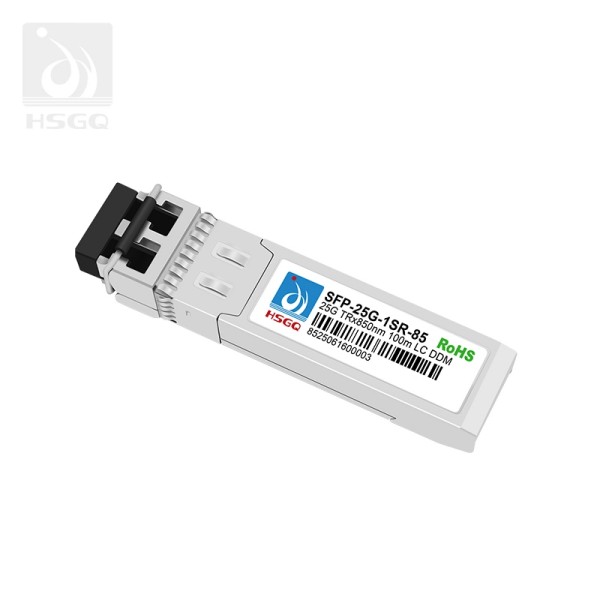
Fiber modules make more sense when distance, interference resistance, or higher-capacity uplinks matter. Standard copper Ethernet is convenient for short runs, but it becomes limiting when the connection needs to cross floors, buildings, equipment rooms, or outdoor pathways. Fiber can support longer transmission distances and is less affected by electrical noise from power equipment, elevators, industrial machinery, or dense cabling areas.
Copper modules still have a place. They are practical for short Ethernet links when RJ45 cabling already exists and the port distance is modest. For server rooms, small offices, and short switch-to-device connections, copper can be simpler and cost-effective. The right choice depends on the link requirement, not on the assumption that fiber is always better.
SFP module single mode vs multimode selection is one of the most common buying questions because both options use fiber, but they serve different distance and infrastructure needs. Single-mode fiber modules are designed for longer links. They use a narrower fiber core and are commonly selected for building-to-building links, campus networks, ISP access networks, and longer backbone connections.
Multimode fiber modules are more common in shorter-distance environments. They are often used inside data rooms, offices, equipment rooms, and rack-to-rack connections. The cable is usually easier to deploy for short links, but distance limits are lower than single-mode options. For many buyers, the practical question is not which one is “better,” but which one matches the installed fiber and the distance target.
A network using existing multimode cabling should not be matched with a single-mode module unless the cabling is replaced or the link is redesigned. Likewise, a long outdoor or campus link usually should not be planned around multimode fiber unless the distance is within the supported range. HSGQ’s category includes both single-mode and multimode options across different rates, so selection should be based on deployment conditions rather than product name alone.
Distance and wavelength are where many mistakes happen. Multimode modules are often associated with 850 nm short-distance links. Single-mode modules commonly use 1310 nm or 1550 nm for longer transmission distances. These labels are not decorative specifications; they determine what type of fiber and opposite-end module the link requires.
Distance ratings also need attention. A module may be rated for 100 m, 300 m, 10 km, 20 km, 40 km, or longer, depending on the design. Buying a module with a much longer rating than necessary is not always the best decision, because optical power levels and receiver sensitivity still need to be suitable for the actual link.
Selection Point | Single Mode | Multimode |
Typical use | Longer links | Shorter links |
Common environment | Campus, ISP, building-to-building | Data room, office building, rack-to-rack |
Main risk | Wrong wavelength or distance rating | Wrong fiber type or distance limit |
Buyer check | Fiber type, distance, wavelength | Fiber type, connector, distance |
Connector type matters as well. LC connectors are common on many fiber modules, while some high-speed modules may use MPO/MTP-style connections depending on the standard. A clean, compatible fiber path is just as important as the module itself.
Speed is important, but it should never be the only selection factor. A 1G module is suitable for standard Gigabit Ethernet uplinks, access switches, and many business networks. A 10G module is often used when switches need higher-capacity uplinks or when traffic from many users is being aggregated. Higher rates such as 25G, 40G, and 100G are usually found in denser network environments, data centers, aggregation layers, or high-traffic backbone links.
The device port must support the selected speed and form factor. A 10G SFP+ port may not operate with every 1G module. A standard SFP slot does not automatically support SFP+, SFP28, QSFP, or QSFP28 modules. Some devices also require compatible coding, firmware support, or vendor-specific acceptance.
HSGQ lists SFP-related categories across multiple rates, including 155M, 1G, 10G, 25G, 40G, 100G, 400G, and 800G module categories. That wide range is useful, but it also means buyers need to check the actual port standard rather than choosing a module only by bandwidth.
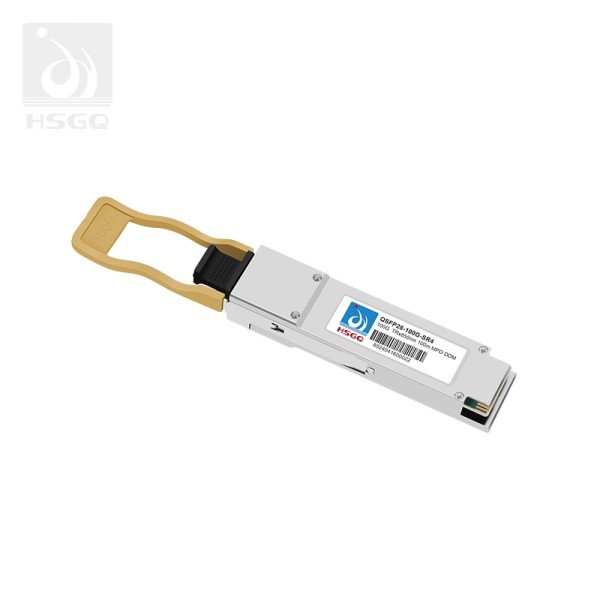
The phrase SFP module 100G is often used by buyers searching for high-speed optical modules, but many 100G products are commonly built around QSFP28-style form factors rather than the same physical design as standard 1G SFP modules. This distinction matters because a high-speed module must match the port shape, electrical interface, optical standard, and cable type.
A 100G-class module fits environments where large traffic volumes need to move between network layers. Data center aggregation, core switching, high-bandwidth uplinks, and large backbone connections are typical examples. These links are not usually chosen for a small access switch or a basic office connection unless the network design truly requires that capacity.
HSGQ’s product category includes 100G module options, including products described for network switches and QSFP28 100G optical transceiver applications. Even so, the best buying rule remains simple: do not choose 100G because it sounds more powerful. Confirm the form factor, supported speed, fiber type, connector, distance, and both-end compatibility before purchasing.
A correct installation starts before the module is inserted. First, confirm the device port type. Check whether the port is SFP, SFP+, SFP28, QSFP, QSFP28, or another format. The module must physically fit, but physical fit alone does not guarantee electrical or optical compatibility.
Next, confirm the required speed. A port designed for 1G operation may not support a 10G transceiver, and a high-speed port may have limits on backward compatibility. The fiber type should also be checked carefully. Single-mode and multimode modules require matching cable types, and the opposite end of the link needs a compatible module.
Wavelength and distance rating should be verified before installation. A 1310 nm single-mode link, for example, should be paired with the correct fiber and a matching optical module at the far end. Connector type is another practical detail, especially when existing patch panels or fiber jumpers are already installed. Compatibility with the switch, router, OLT, or media converter should also be checked because some devices reject unsupported modules even when the optical specifications appear correct.
Installation is usually straightforward, but careful handling prevents avoidable link problems. Keep the dust cap on the module until the cable is ready to connect. Fiber connectors are sensitive to dust, oil, and scratches, so touching the end face can cause signal loss even when everything else is correct.
Insert the module gently into the SFP port until it is seated firmly. Do not force it. If the latch or bail handle does not align properly, remove the module and check the orientation. Once seated, connect the correct fiber or copper cable. For fiber links, make sure transmit and receive directions are correct if using a duplex connection.
After connection, check the device interface status and link lights. If the switch or router supports DOM or DDM monitoring, review optical power, temperature, voltage, and transmit or receive levels. These readings can help detect dirty connectors, weak signals, or mismatched optics before the link becomes unstable.
Before considering the installation complete, use this quick checklist:
● Port type checked
● Speed checked
● Fiber mode checked
● Wavelength checked
● Distance rating checked
● Connector type checked
● Opposite-end module checked
● Link status verified
Safe handling should become routine. Avoid sharp bends in fiber patch cords, clean connectors when troubleshooting, and label both ends of the link. Good labeling saves time later when ports are moved, upgraded, or tested during maintenance.
The most common mistake is buying by speed alone. A faster module will not improve a link if the device port cannot support it. Another frequent issue is mixing single-mode and multimode fiber, which can create immediate link failure or unstable performance. Wavelength mismatch is equally problematic because both ends of the link must transmit and receive in a compatible way.
Distance ratings are often misunderstood. A module rated for 20 km is not automatically better for a 50 m link, and a short-reach module will not support a long outdoor run. Device compatibility also deserves attention. Some switches accept a wide range of modules, while others require specific coding or approved transceiver profiles.
100G selection adds another layer of risk. Buyers sometimes treat 100G modules as if they are interchangeable with lower-speed SFP products, but form factor and port support can be completely different. When a link does not come up, start with compatibility. If the link is unstable, inspect fiber cleanliness, bend radius, and optical power. If the port rejects the module, check device support before replacing the cable.
An SFP module is a small component, but it plays a major role in building flexible, reliable network links. By matching the port type, speed, cable, fiber mode, wavelength, and distance rating, users can avoid common connection failures and choose modules that fit real deployment needs.
Shenzhen HS Fiber Communication Equipment CO., LTD. provides SFP-related products for switches, routers, media converters, and fiber network applications, helping businesses adapt links, extend transmission distance, and manage network upgrades with less hardware replacement.
A: SFP stands for Small Form-factor Pluggable. It is a compact, hot-swappable transceiver used to connect network equipment through fiber or copper links.
A: An SFP module connects switches, routers, servers, and media converters by converting electrical signals into optical or copper-based signals for network transmission.
A: Standard SFP is commonly used for lower-speed links, SFP+ supports 10G connections, and SFP28 is designed for 25G network applications.
A: Choose multimode for short in-building or data center links. Choose single mode for longer campus, building-to-building, or telecom fiber connections.
A: 100G modules suit backbone, data center spine, ISP aggregation, and high-traffic switch-to-switch links where fewer, higher-capacity uplinks are needed.