Views: 0 Author: Site Editor Publish Time: 2026-04-24 Origin: Site
Modern fiber access does not always need a bulky terminal. An xpon stick offers a compact plug-in option for flexible deployment. In this article, you will learn how an xpon stick works, when to use an xpon stick for wifi router, how it compares with an xgs-pon onu stick, and what to check before choosing one.
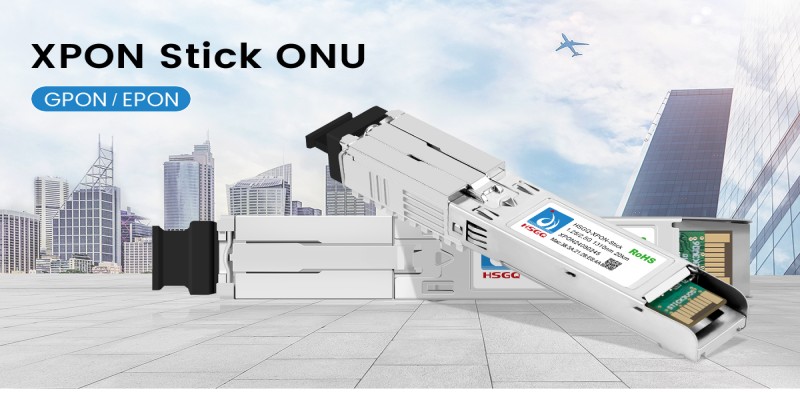
An XPON Stick is a compact optical access device built in an SFP-like form factor, but functionally it works as an ONU rather than a standard pluggable transceiver. Its main appeal is that it can be inserted directly into equipment with an SFP slot, which reduces extra cabling, avoids a separate external housing, and simplifies fiber access in space-sensitive deployments. It is especially relevant for lean FTTH builds and specialized access scenarios that need compact integration instead of a bulky endpoint layout.
A conventional ONU or ONT is usually a standalone box with its own enclosure, external power arrangement, and dedicated installation position. By contrast, an xpon stick combines optical access capability with a pluggable SFP-style design, so it can sit directly inside compatible switches, cameras, or other network devices. That difference matters in projects where physical footprint, cleaner cabling, and faster installation are more important than using a separate terminal box.
Deployment factor | XPON Stick approach |
Device form | SFP-style pluggable ONU |
Installation method | Direct insertion into compatible SFP-slot equipment |
Access mode | GPON/EPON adaptive |
Typical strength | Compact, plug-and-play deployment |
Power profile | 3.3V, under 2.5W |
Reach | Up to 20 km |
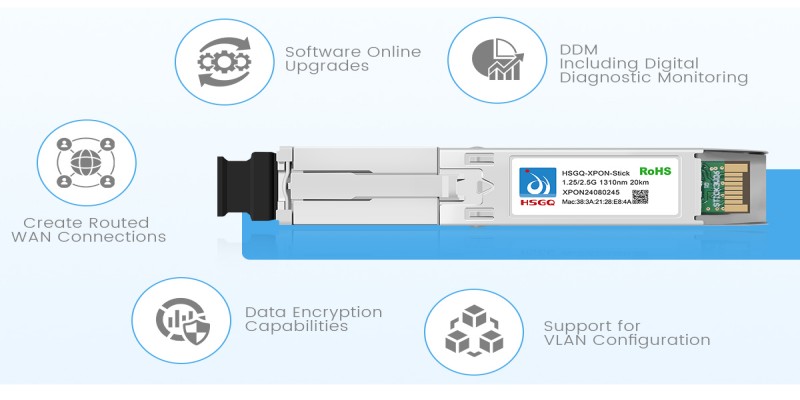
The most relevant capabilities are operational rather than cosmetic. The product supports upstream/downstream rates up to 1.25G/2.5G, transmission distances up to 20 km, and features such as DDM, VLAN configuration, routed WAN creation, data encryption, and online software upgrades. It also supports SFU mode, with some optional HGU-related functions such as DHCP, PPPoE, and NAT. Together, these features make the device more than a simple optical adapter. They make it suitable for real access scenarios that require visibility, service flexibility, and manageable deployment behavior.
The compact design is especially useful where equipment density, cabinet space, or installation speed matters. With a size of 8.2 × 6.8 × 75 mm, a weight of under 19 g, and power consumption below 2.5 W, it supports lighter and cleaner integration than a standalone terminal. This makes the format practical for simplified network builds that need optical access without adding another full-size endpoint device.
Using an XPON Stick in a live network is less about complex installation and more about making sure the target device, service profile, and access environment all match. It is a plug-and-play ONU in an SFP-style form factor, with GPON/EPON adaptive support, a PON port with SC interface, optional HGU-related functions such as DHCP, PPPoE, and NAT, and features like VLAN configuration, routed WAN creation, and online software upgrades. Those details matter because deployment is not only physical insertion into a slot. It also involves service-side compatibility and basic access configuration.
Before installation, the first step is to confirm that the receiving device has a compatible SFP slot and that the intended network is using a service model the stick can support. The unit is designed to be inserted directly into devices such as switches and cameras, while also adapting to different operator infrastructures through GPON/EPON access. In practice, that means checking slot compatibility, fiber availability, service provisioning requirements, and whether the deployment will run in SFU mode or require optional higher-layer functions. It is also worth checking environmental conditions, since the device supports both commercial and industrial temperature ranges, along with a 3.3V power supply and power consumption under 2.5W.
Deployment item | What to verify |
Host device | SFP slot availability and hardware compatibility |
Access mode | GPON/EPON service alignment |
Fiber connection | SC-based PON link readiness |
Service profile | VLAN, routed WAN, and operator-side activation needs |
Power and environment | 3.3V input, under 2.5W, suitable operating conditions |
Once compatibility is confirmed, the xpon stick is inserted into the host device’s SFP slot and linked to the optical line through its PON interface. This format is what makes it attractive in real deployments: the access device no longer needs to sit beside the router or switch as a separate boxed ONU. The design supports faster and cleaner installation by reducing extra wiring and simplifying physical integration, especially in compact cabinets or equipment-dense environments.
For an xpon stick for wifi router setup, the most important point is that the router must support the required slot and recognize the access path correctly. After the stick is physically installed, deployment typically depends on enabling the right logical service parameters rather than adding extra hardware. Because the device supports VLAN configuration, routed WAN creation, and optional DHCP, PPPoE, and NAT functions, router-side integration can be streamlined when the device and service profile are aligned.
After activation, operators should focus on a few practical checks to keep the link stable:
● Confirm that the optical service is provisioned in the correct GPON or EPON mode.
● Verify VLAN and routed WAN settings if traffic is not passing as expected.
● Use available DDM and management-related functions to monitor operating status.
● Check that the host device can deliver stable power within the specified range.
● Keep firmware current when online software upgrades are supported.
An xpon stick stands out because it turns optical access into something far more compact and deployment-friendly than a conventional standalone terminal. It can be plugged directly into devices with compatible SFP ports, which helps reduce extra cabling, external power arrangements, and installation complexity. That design is especially useful in projects where cabinet space is limited or where a cleaner hardware layout matters as much as service delivery. It also supports plug-and-play deployment, GPON/EPON adaptive access, power consumption under 2.5W, and data rates up to 1.25G/2.5G, all of which reinforce its value in compact fiber builds.
The biggest practical strengths come from the way the device combines optical access and a pluggable module structure. Instead of installing a separate ONU or ONT box, operators can integrate the fiber access function more directly into compatible equipment such as switches or cameras. That can simplify deployment, shorten installation time, and reduce visible hardware clutter in dense or specialized network environments. It also supports DDM, VLAN configuration, routed WAN creation, data encryption, and online software upgrades, so the value is not only physical convenience but also usable network-side functionality.
Aspect | XPON Stick advantage |
Form factor | SFP-style pluggable design |
Installation | Plug-and-play deployment |
Access flexibility | GPON/EPON adaptive support |
Space use | Minimal footprint in compact builds |
Power profile | 3.3V supply, under 2.5W |
Network functions | VLAN, DDM, encryption, software upgrades |
The same design that makes an xpon stick attractive also creates trade-offs. It depends heavily on host-device compatibility, so the deployment only works smoothly when the target equipment has the right slot and can support the intended access setup. It is also more valuable in specialized scenarios than in every general-purpose installation. In practice, users need to think beyond size and ask whether their deployment requires broader terminal features, easier stand-alone management, or less dependence on the host hardware environment.
A standard ONU, ONT, or another fiber terminal may be more suitable when the network does not benefit from an SFP-style build or when the endpoint needs a more conventional standalone deployment model. It can also be the better option if compatibility with the host device is uncertain, if the installation environment does not favor pluggable integration, or if the project needs a more typical access terminal layout rather than a specialized compact design. The optional support for some higher-layer functions such as DHCP, PPPoE, and NAT also means feature expectations should be checked carefully before choosing a stick-based approach.
Choosing the right XPON Stick starts with understanding what the product is designed to do in a real network rather than treating it like a generic SFP module. It is an ONU in an SFP-style form factor with GPON/EPON adaptive access, plug-and-play deployment, transmission rates up to 1.25G/2.5G, and support for up to 20 km transmission distance. That means selection should be based on access architecture, service expectations, and how directly the stick will integrate with the target device.
The first question is whether your network actually benefits from a compact pluggable ONU instead of a standalone terminal. If the goal is to save space, reduce extra cabling, and simplify deployment in a device that already has an SFP slot, an xpon stick is a strong fit. If the deployment also needs flexible access across different operator infrastructures, its GPON/EPON adaptive capability becomes especially relevant. For projects serving routine broadband, office access, or compact FTTH installations, the listed speed range and long-distance support are often enough to meet service needs without adding more hardware than necessary.
Selection factor | What to look for |
Bandwidth target | Whether 1.25G/2.5G access fits the service plan |
Access type | GPON/EPON compatibility with the live network |
Deployment goal | Space-saving integration vs. standalone terminal use |
Link distance | Whether up to 20 km meets the topology requirement |
Device role | Router, switch, camera, or other host with SFP slot |
Beyond speed, buyers should compare how well the stick matches the host device and how much operational control the deployment requires. It is designed for insertion into switches and cameras, which shows that host-side compatibility is central to the buying decision. It also supports DDM, VLAN configuration, routed WAN creation, data encryption, and online software upgrades, so the right choice depends on whether those functions are enough for monitoring, segmentation, security, and lifecycle maintenance in your network. Optional support for some HGU-related functions such as DHCP, PPPoE, and NAT is another useful checkpoint when the stick may interact closely with routing logic.
A standard xpon stick is usually enough when the network is built around GPON or EPON access and the main priority is compact, efficient integration. It makes sense in deployments where existing service bandwidth, physical footprint, and straightforward access activation matter more than pushing to a higher-capacity optical tier. An xgs-pon onu stick becomes more relevant when the deployment roadmap points to higher bandwidth demand, more capacity-intensive services, or a next-generation PON environment rather than a conventional GPON/EPON setup. The deciding factor is whether current and near-future network goals will exceed what a standard XPON access design is meant to deliver.
The strongest application scenarios for an XPON Stick come from the same qualities that define the product: an SFP-style design, plug-and-play deployment, GPON/EPON adaptive access, support for up to 1.25G/2.5G rates, and a compact, low-power structure that can be inserted directly into compatible devices such as switches and cameras. Its value is tied to flexible deployment rather than one narrow use case.
For home upgrades, the main advantage is cleaner fiber integration without adding another bulky terminal box near the router or access point. The stick supports high-speed connectivity for use cases such as streaming and online services, while also enabling easier installation through direct insertion into compatible SFP-slot equipment. In a home environment where space is limited and users want to simplify visible wiring, that combination makes the format particularly attractive.
In SME deployments, an XPON Stick is useful when network teams want to save cabinet space, simplify edge connectivity, and avoid unnecessary hardware sprawl. It can be inserted into SFP slots on equipment such as switches, and it also supports features such as VLAN, routed WAN creation, data encryption, and online software upgrades. Those functions are relevant in office or branch environments where traffic separation, maintainability, and reliable optical access matter just as much as compact hardware design.
Scenario | Why the XPON Stick fits |
Home upgrades | Cleaner fiber integration and less visible hardware |
SMEs | Space-saving deployment with useful network-side features |
Smart home and IoT | Easy insertion into compact or distributed device environments |
Remote or temporary access | Flexible rollout with long-distance optical reach |
Smart home and IoT environments often involve distributed devices, limited installation space, and a preference for integrated rather than standalone hardware. Because the product is small in size, weighs under 19 g, and uses under 2.5 W, it suits deployments where low footprint and lower power demand help simplify rollout. Its ability to work directly with compatible network devices also supports cleaner optical access in distributed layouts.
In remote sites or temporary deployments, the main advantages are speed and flexibility. With transmission distance up to 20 kilometers and a straightforward plug-and-play setup, the stick can support access in locations where conventional wiring is difficult, equipment space is limited, or fast service activation matters more than a full standalone terminal layout. In these environments, direct integration and simplified deployment can be more valuable than a traditional boxed endpoint.
The xpon stick delivers compact, flexible fiber access for homes, businesses, IoT, and temporary deployments. Its value depends on the right match between compatibility, bandwidth needs, features, and installation conditions. With plug-in design, adaptive access support, and practical service capabilities, Shenzhen HS Fiber Communication Equipment CO., LTD. provides a solution that helps simplify deployment while supporting efficient network integration.
A: An xpon stick provides fiber access through an SFP-style form factor for compact network deployment.
A: An xpon stick for wifi router only works if the router supports the required slot and service profile.
A: Choose an xgs-pon onu stick when higher bandwidth and next-generation PON capacity are required.
A: An xpon stick is better when space, cabling simplicity, and direct device integration matter most.